
Getting Started
Learn the basics of Task Board in just 5 minutes
Welcome to Task Board!
This guide will help you set up your first board and start tracking time. Follow these 5 simple steps to get started.
Task Board is a kanban-style project management tool with built-in time tracking. Unlike complex tools that require hours of setup and training, Task Board is designed to work the way you think. Create boards for your projects, add tasks as cards, and drag them through your workflow. The built-in timer means you never need a separate time tracking app, everything stays in one place.
Create Your First Board
Boards are where you organize your tasks. Think of them as projects or workspaces.
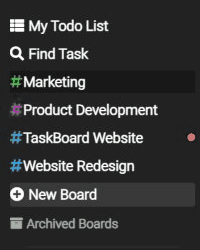
- Click "New Board" in the sidebar
- Give your board a name (e.g., "Marketing Projects" or "Client Work")
- Click "Create"
Customize Your Columns
Boards come with default columns: To Do → In Progress → Done. You can customize these to match your workflow.
- Click "+ Add Column" to create new columns
- Drag columns to reorder them
- Click a column name to rename it
Create Your First Task
Tasks are the individual items you need to complete. They can have descriptions, priorities, tags, and assignees.
- Click "+ Add Task" in any column
- Enter a task title
- Add a description (optional but helpful)
- Click "Create"
Start Tracking Time
Task Board has built-in time tracking. No need for a separate tool like Clockify or Toggl.
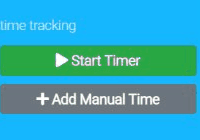
- Open a task by clicking on it
- Click the "Start Timer" button
- Work on the task
- Click "Stop Timer" when you're done
- Your time is automatically logged!
Move Tasks Through Your Workflow
As you work, move tasks between columns to show their progress.
- Simply drag and drop tasks between columns
- Tasks in the rightmost column are typically "Done"
- Your team can see progress at a glance
Frequently Asked Questions
How many boards can I create?
On the free Solo plan, you can create up to 5 boards. The Team plan allows unlimited boards. Each board can have unlimited tasks regardless of your plan.
Can I use Task Board on my phone?
Yes, Task Board is a web application that works in any modern browser, including mobile browsers. Simply navigate to task-board.app on your phone's browser. The interface adapts to smaller screens automatically.
What's the difference between columns and tags?
Columns represent stages in your workflow and tasks move through them from left to right as work progresses. Tags are labels you attach to tasks for categorisation and filtering. A task is always in exactly one column but can have multiple tags.
Can I archive completed boards?
Yes, you can archive boards you're no longer actively using. Archived boards don't count toward your board limit and can be restored at any time. All data including time entries and comments is preserved.
Do I need to download any software?
No, Task Board runs entirely in your web browser. There's nothing to download or install. Simply create an account at task-board.app and start using it immediately.
Need help?
Contact us at help@task-board.io - we typically respond within a few hours.